Monitor Dashboards
The first tab of the Monitor section provides detailed metrics for different communication channels, such as Voice, Email, SMS, and Chat. These metrics vary depending on the hierarchy of the contact center you select.
To efficiently manage all the contact centers within an organization, a broad hierarchical structure is defined as follows:
- Call Center: The second level of the hierarchy, dividing your LiveVox portal into geographic locations, lines of business, or other appropriate groupings. This separation helps track the performance of different business areas.
- Service Groups: Service Groups are created to blend traffic from different services. Each Service Group contains multiple Services.
On the Monitor tab, in the left pane, select the hierarchical level for which you want to view information. Choose from Enterprise, Call Center, Service, and Service Group. The right pane displays information for different communication channels based on the levels selected.
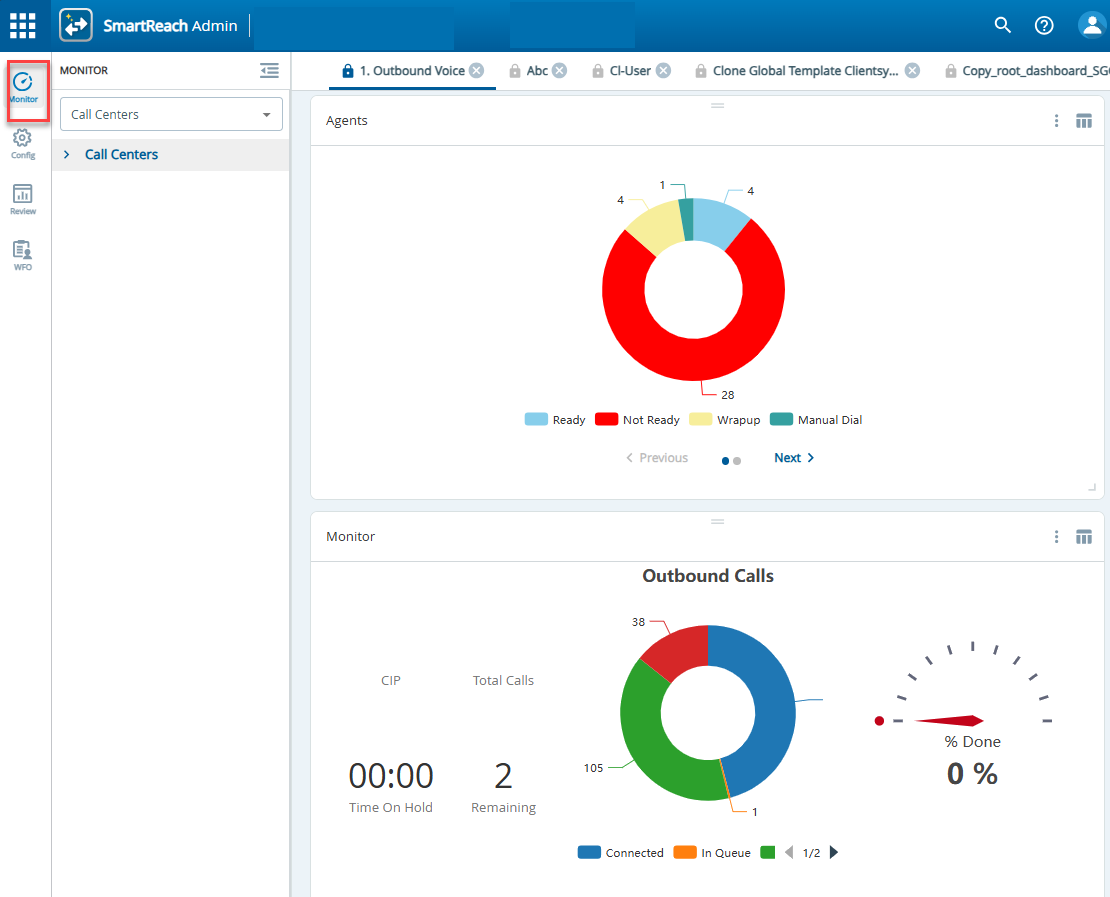

Dashboard widgets can temporarily fail to display correctly after an update to the monitoring dashboard user interface . For example, the widgets may not be aligned properly, or some widgets may not appear correctly. This behavior might be due to a stale browser cache. You can clear the browser cache or site data to restore normal behavior. Follow browser-specific instructions to clear the cache.
Selecting Hierarchy Levels of Monitor Dashboard
You can select different hierarchies such as Call Center, and Service Group.
To select a hierarchy level:
- Navigate to the Monitor tab.
- Using the drop-down, select the hierarchy level. Choose between Call Centers and Service Groups.
This section contains the following topics: