The General tab contains the basic settings for the service (that is, the value specified in the Service field). 

Unified Configuration Manager Restrictions
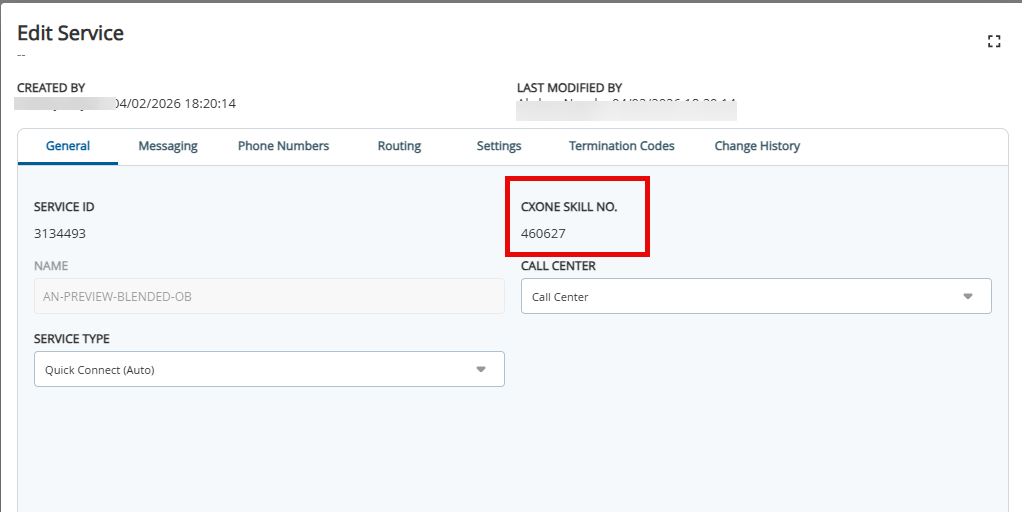
Outbound Engagement has implemented configuration restrictions within the Configuration Manager to better align with the unified CXone platform. The Service Editor features a simplified interface where redundant fields are disabled or hidden, and a new CXone Service ID field is visible to provide a clear link between services and their corresponding CXOne skills.

The following options are disabled in the Services Editor when the client is set to SmartReach Client User Interface:

  • Service Delete
  • Service Copy
  • Service Name 
  • Service Type, Call Direction, and ACD Mode


SectionFieldDescription
ServiceSERVICE IDA unique identifier that is assigned by SmartReach.
NAMEName of the service.
CXONE SKILL NO.Links the service with the corresponding CXone skill.
CALL CENTER The call center in which the service is organized.
Service TypeSERVICE TYPE

Type of the service.

This field contains the following options, where the text that appears in parentheses is the associated cloud profile.

Option

Description

Basic (Auto)

A blended multi-channel service that supports inbound and outbound interactions and contains the following features:

  • Outbound and inbound voice
  • Attended voice campaigns
  • Email and SMS campaigns
  • Two-way email, SMS, and chat communication
  • Click-enabled voice, email, and SMS (with the purchase of CRM)

The Basic service runs through SmartReach's automated queuers and does not support the following features:

  • Preview All campaigns
  • HCI or 10DMT campaigns
  • Unattended voice campaigns
  • Whisper voice campaigns

When you select this value:

  • The value in the Call Direction field is Blended and the field is disabled.
  • The Inbound tab appears.
  • The Inbound Phone Number table appears on the Phone Numbers tab.
  • When you attempt to upload a campaign, only the following values appear in the Upload Campaign window:
    • Messaging
    • Outbound
    • SMS

Human Call Initiator (HCI)

Not available at this time. A service in which an agent (that is, a clicker agent) manually launches a call. 

If a consumer answers the call, the call is routed to the closer agent, who speaks with the consumer. 

Human Text Initiator (HTI)

 Not available at this time. The Human Text Initiator (HTI) service enables agents (Clicker Agents) to manually launch text messages.

  • For assistance with an HTI configuration, contact the Account Team.
  • The HTI service enables agents other than Closer Agents to reply to SMS messages. Closer Agents are not required to launch the SMS messages.

Inbound

A service that receives and directs callers using a designated Interactive Voice Response (IVR). IB services can be configured to route to agent teams, to certain outbound services using service groups, to themselves using service routing, to voicemail boxes, a self-service IVR, or a combination of these.

Manual (Manual)

A human-initiated service in which an agent must manually enter all ten digits of a telephone number on the keypad to launch a call. The same agent handles the call.

Preview All (Preview)

A human-initiated service that presents the telephone number to an agent who can choose to either click the number to launch the call or skip the number. The same agent handles the call.

International Number Support

The SmartReach portal now supports the E.164 format for the international outbound Preview dialing service and any other automated dialing service.

Quick Connect (Auto)

An automated outbound service that immediately connects live answers with an available agent.

Unattended (Auto)

An automated outbound service that immediately connects with an IVR application. Regardless of the responses provided, the called party cannot be connected to an agent. 

Whisper (Auto)

An automated outbound service that immediately connects with an IVR application. Based on the responses provided, the called party can be connected to the agent through an inbound voice.

10DMT (Manual)

A human-initiated service in which an agent must manually enter all ten digits of a telephone number on the keypad to launch a call. The agent is unable to copy and paste any numbers into the keypad. If the agent enters an incorrect number, the number is ignored and the screen remains unchanged until the agent enters the correct number. The call is launched when the agent enters the correct number.

If a consumer answers the call, the call is routed to the closer agent, who speaks with the consumer.

API Enabled (API Enabled)

A service that allows manual dialing of desktop application programming interface (API) integrations.

SMS (Auto)

A high-capacity North American Short Messaging Service (SMS) that interfaces with its outbound dialing systems. It offers both standard rate and Free-to-End-User (FTEU) dedicated common short code (CSC), long code, and toll-free SMS services that have complete mobile carrier coverage in both the United States and Canada.
Created ByName of the user who created the service.
Last Modified ByName of the user who last modified the service.

The following table contains the options that are available for the answering machine, pacing, and ACD mode for the specified service types.

Service Type (Cloud Profile)

Answering Machine Options

Pacing Options

ACD Mode Options

Basic (Auto)
  • Don't Leave Messages
  • Leave Messages
  • Lines Per Agent (#/Agent)
  • Max CIP
  • Abandon Rate
  • Agent at Ready In
  • Agent at Ready Out
  • Agent Call Out

HCI (HCI)

Not available at this time.

  • Don't Leave Messages
  • Transfer all Connections
  • Lines Per Agent
  • Max CIP
HCI

HTI (HTI)

Not available at this time.

  • Don't Leave Messages
  • Leave Messages
  • Transfer all Connections
  • Lines Per Agent (#/Agent)
  • Max CIP
HTI
InboundDon't Leave MessagesN/A
  • Agent At Ready In
  • Agent At Ready Out
  • Agent Call Out
  • No Acd
Manual (Manual)N/A
  • Lines Per Agent
  • Max CIP
Manual
Preview All (Preview)Transfer all Connections
  • Lines Per Agent
  • Max CIP
  • Agent At Ready In
  • Agent At Ready Out
  • Agent Call Out
Quick Connect (Auto)
  • Don't Leave Messages
  • Leave Messages
  • Transfer all Connections
  • Lines Per Agent
  • Max CIP
  • Abandon Rate
  • Agent At Ready In
  • Agent At Ready Out
  • Agent Call Out
Unattended (Auto)
  • Don't Leave Messages
  • Leave Messages
Max CIP

No Acd

Whisper (Auto)
  • Don't Leave Messages
  • Leave Messages
  • Lines Per Agent
  • Max CIP
No Acd
10DMT (Manual)
  • Don't Leave Messages
  • Transfer all Connections
  • Lines Per Agent
  • Max CIP
10DMT
API Enabled (API Enabled)N/A
  • Lines Per Agent
  • Max CIP
  • 10DMT
  • HCI
  • Manual
  • HCI
SMS (Auto)
  • Don't Leave Messages
  • Transfer all Connections
Max CIPNo Acd