Download PDF
Download page Working with Scripts.
Working with Scripts
The Scripter feature enables you to build dynamic scripts to guide an agent through various customer interactions (for example, onboarding, processing accounts, submitting surveys, diagnosing issues, and fulfilling orders). Scripter lets you define dynamic workflows and scripts that help agents deliver consistent and clear communications to customers regardless of whether you’re running an inbound, outbound, or fully blended contact center. Scripter pulls together all relevant information your agents might need for any call scenario using the Desk solution, Desk eliminates data silos between multiple systems and eradicates the frustrating click-through of different screens so your agents can concentrate on the matter at hand.
You can make API calls to external web-enabled platforms and trigger automated actions at specific points within your script. The scripter information is recorded and saved in Contact Manager for analysis.
The agent can capture the information while on a call with the customer; the tool functions as a navigation screen for an agent to traverse between screens. Based on your knowledge of the business workflows and the tasks your agents need to complete while on a call, you can create scripts that range from simple step-by-step guides to more complex scenarios involving conditional logic.

You can configure a preferred number format that will be applied across the platform.
The image below shows the fields in Scripter, and the table describes each field:
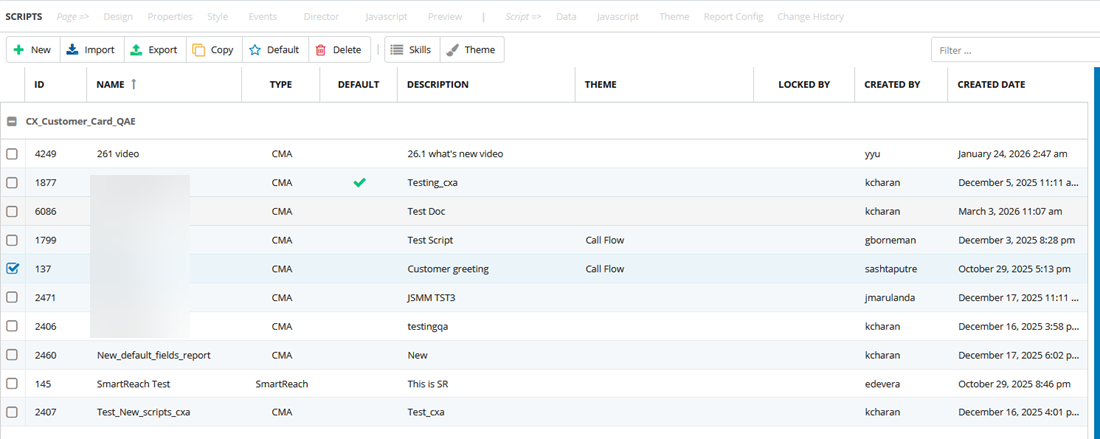
| ID | Name | Type | Default | Description | Theme | Locked By | Created By | Created Date |
|---|---|---|---|---|---|---|---|---|
| Unique Script ID is generated automatically | Displays script name | Indicates whether the script is applicable for SmartReach or CXone | Indicates whether the selected Type is client default or not | Displays the description | A theme is a preconfigured design that enhances the presentation of a script. It is a consistent and unified set of visual elements and styles applied to backgrounds, text, and buttons. Implementing a theme feature in your Scripter application can enhance the agent's experience and streamline the design process. | If the script is opened and used by anyone, the script shows a locked state. | Displays the name of the person who created the script. | Shows the script created dated. |
Using the Script tab you can create, modify, import, export, copy, delete, or view a script. The following table describes the subtabs that appear on the Scripts tab.
| Subtab | Description |
|---|---|
| SCRIPTS | Enables you to view and manage scripts and assign scripts to services. |
| Page=> | |
| Design | Enables you to design a script page, including its layout. |
| Properties | Enables you to specify the properties of a script page. |
| Style | Enables you to specify a style for the script page. |
| Events | Enables you to define actions or events for the script page. |
| Director | Enables you to create and manage events for use within the script. The ability to create and manage events is vital to providing a flexible and dynamic workspace for agents. |
| Javascript | Enables you to define or embed custom JavaScript code to be used at the script-page level. |
| Preview | Enables you to preview and test the script page from an agent's perspective. |
| Script=> | |
| Data | Enables you to define a new variable to be used within the script and import screenpop variables from the SmartReach platform. |
| Javascript | Enables you to define or embed custom JavaScript code to be used at the script-page level. |
| Theme | Enables you to change the style of the elements within a script. You cannot edit the default theme; however, you can create a new theme and apply it to the following elements:
|
| Report Config | Enables you to retrieve information stored in the database that is collected during a call. |
| Change History | Enables you to view all the changes made to the script. |
This section contains the following topics.