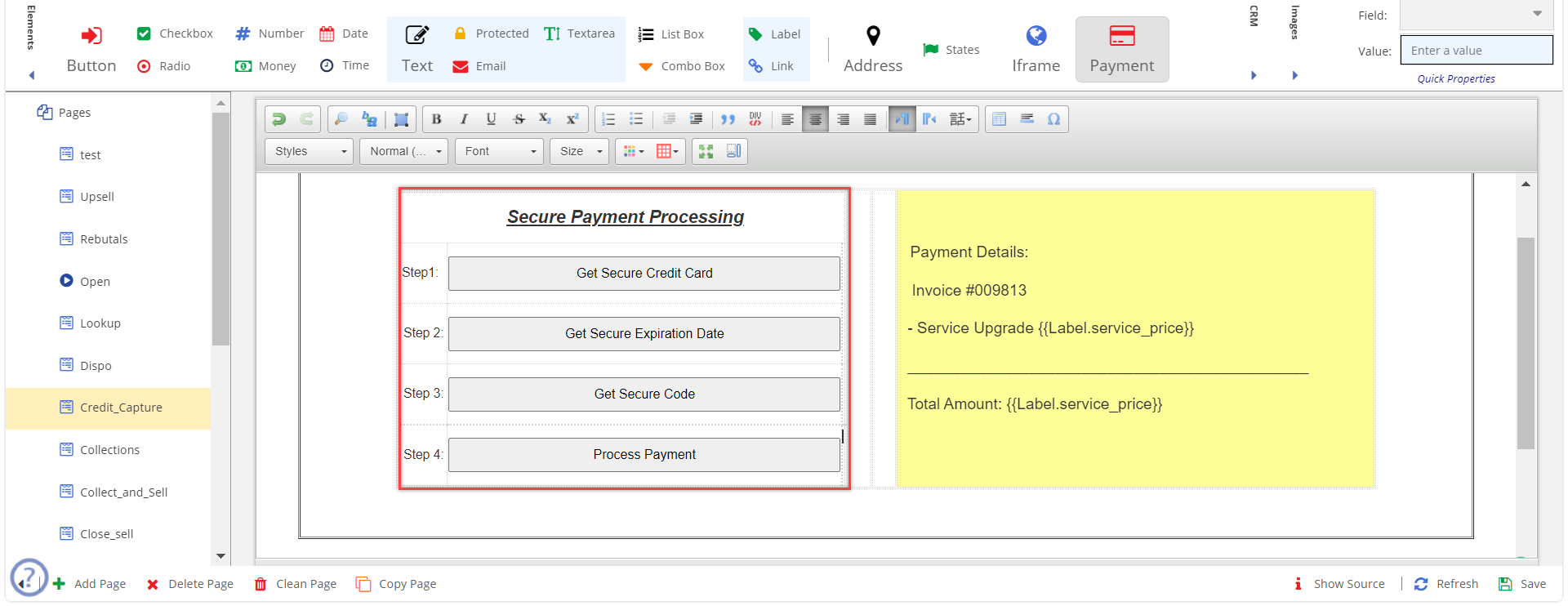
Download page Adding the Secure Payment Capture Service.
Adding the Secure Payment Capture Service
The Advanced Secure Payment Capture (SPC) service is a new feature included in the Script application. This feature must be enabled by a manager. If the SPC functionality is enabled, then an agent can bill the customer using this feature.To initiate Secure Payment Capture, one or more of the following widgets must be configured by your manager and available on your desktop:
Credit Card Basic
Check Basic
Credit Card Advanced
Check Advanced
Designing SPC
The SPC button is present in the Elements area.
To enable SPC:
On theDesigntab, in theElementsarea, drag and drop thePaymentsoption to theDesignarea. The payment capturing events and properties are already set in the SPC elements.
Update the fields as required, and clickSave. The information is updated and the page is saved.
You can add elements to the page to process the payment details.
SPC in the Agent Desktop
To process the payment details, the agent must:
Get the Credit Number from the customer. The customer remotely enters the details. The card number is verified.
Request the expiration date.
Verify the CCV number from the customer.
ClickProcess Payment. Based on the payment process information. The agent clicks the provided options.