The Iframe within the scripter allows you to add a webpage layout onto the page of the script instead of having an additional window pop.An Iframe enables you to embed a URL inside a script.
To enable an Iframe:
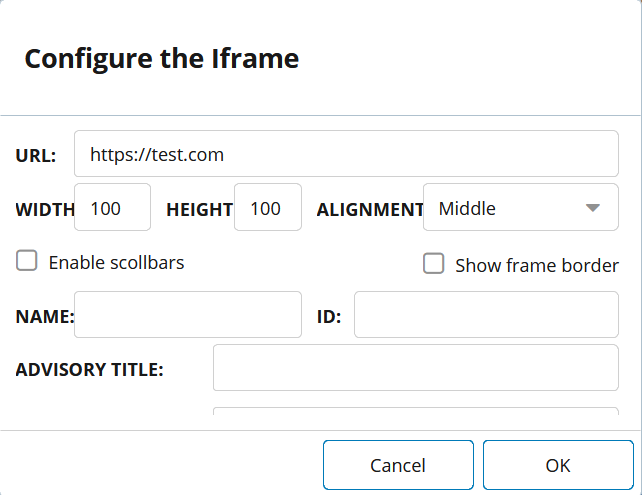
On theDesigntab, in theElementsarea, drag and drop theIframeicon on the page. TheConfigure the Iframewindow appears.
Specify the following fields:
Fields
Descriptions
URL
Specify the URL of the webpage.
Width, Height, and Alignment
Specify the width, height, and alignment of the window.
Enable scrollbars
Enable if you need a scrollbar option for the window.
Show frame border
Enable if you need the frame border for the window.
Name
Specify the window name.
Id
Specify the window ID.
Advisory Title
Specify the title that you want to appear on the mouseover.
Long Description URL
Specify the description for the URL.
You should provide the URL, width, and height for the frame.Because the script page is loaded with https, any non-secure connections within an iframe are not allowed.
When you add an iFrame to the script, it appears on Desk.