The Services tab of Client editor displays the details on each service, including current dialing information. A service is a virtual agent group with predefined attributes including but not limited to messaging, compliance rules, and termination codes. A service exists within a single call center. The settings for a Service determine how agents handle interactions or reach out to customers through voice, chat, SMS, or email channels. For example, manual service handles manual calls. See Working with the Services Editor for more information.
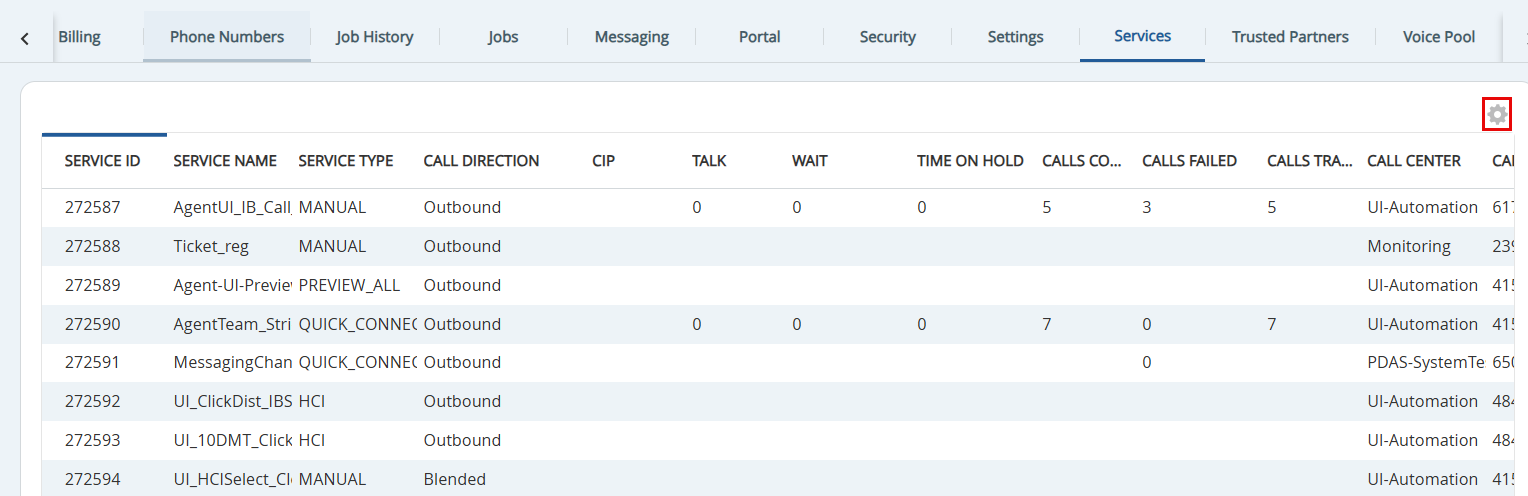
Using the cog icon in the upper right-hand corner, you can specify the inclusion of fields, order, and which field is used to sort the list. Double-clicking a service name opens the Services editor.
The Services tab displays the following fields:
- SERVICE ID: Displays the SmartReach assigned unique identifier code.
- SERVICE NAME: Displays the name of the service.
- SERVICE TYPE: Displays the service type for the service name.
- CALL DIRECTION: Displays the call direction, whether the service launches outbound calls or receives inbound calls.
- CIP: The number of calls currently in progress.
- TALK: Total time agent was in call.
- WAIT: Number of calls currently waiting in the queue.
- TIME ON HOLD: The longest hold duration of all calls in the hold queue for the call center or service.
- CALLS CONNECTED: Total number of connected calls/transactions.
- CALL FAILED: Total number of calls that terminated without a connection.
- CALLS TRANSFERRED: The number of calls presented to the service for ACD routing.
- CALL CENTER: The Call Center in which the service is organized.
- CALLER ID: Displays the Local Caller ID.
- OPERATOR PHONE: The number used when dialing using extensions rather than DIDs.
- CALLBACK PHONE: The number used in answering machine messages.
- MESSAGE: Displays the properties as set in Messaging tab.
- INBOUND MESSAGE: Displays the message associated with the inbound service.
- INBOUND NUMBER: Displays the number associated with the inbound service.
- CARRIER: Displays the carrier name.
- NUMBER TYPE: Displays the Number Type by Agent at ready in, Callback, Caller ID, Group voice mail, Inbound, Local caller ID, Other and Personal voice mail.