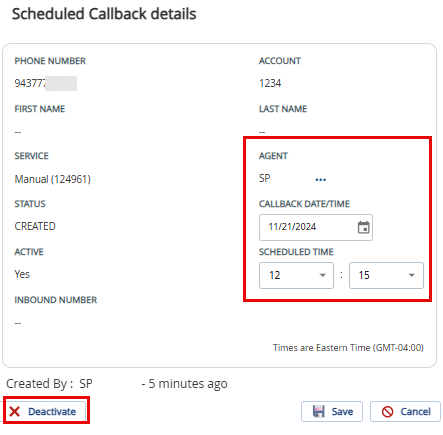
Outbound Engagement (SmartReach) Admin Guide Agent Workspace Managing Agents and Agent Desktops Agent Desktop Managing Scheduled Callbacks Current: Modifying and Deactivating Scheduled Callbacks Modifying and Deactivating Scheduled Callbacks Adjusting Scheduled CallbacksTo modify the schedule of a callback record:Double-click the record to view the Scheduled Callbacks details screen. Select the link next to the Agent field to search for and assign a new agent for the callback.Enter the preferred date in the Scheduled Date field or choose using the calendar button to update the date for the scheduled callback record.Modify the Scheduled Time from the drop-down menu.Click Save to save the changes. You can modify the schedule of the present-day's missed scheduled callback records which includes:Records presented to an agent and timed out without the agent taking an action,Records missed due to the non-availability of agents at the scheduled time.Records with CREATED or PICKED status are editable.You cannot modify a scheduled callback record that is scheduled through the IVR. Deactivating Scheduled CallbacksTo deactivate the scheduled callback:Double-click the record to view the Scheduled Callbacks details screen.Click the Deactivate button. You can cancel the scheduled callback as long as it is not queued up for dialing. ×