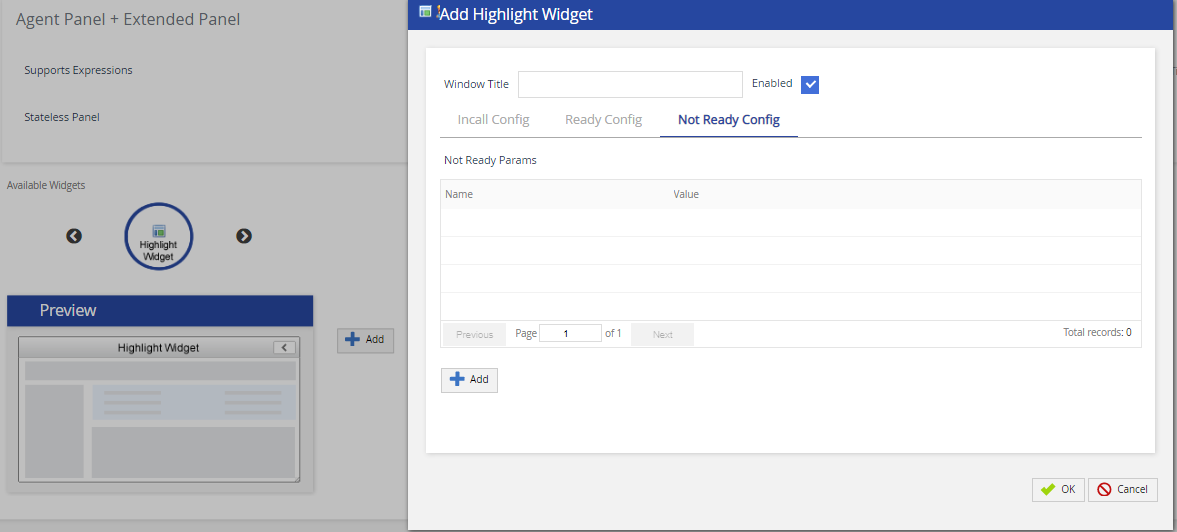
The Highlight widgetdisplays the most pertinent information on every call and is placed at the top of the extended panel of the Agent Desktop.
To add a widget:
SelectHighlightfrom the available widgets section and click Add. TheAdd Highlight Widgetpop-up appears.
Clickthe Add button to add fields and their values.The configuration screen displays three tabs that allow users to set up for the three different agent states:
In Call config
Ready config
Not Ready config
You can add up to six account fields on each configuration state.
When rendered in the widget these fields are displayed in the order they are shown in the configuration, starting from the top left and then continuing to the left and down.
ClickOKto save the changes.
Click theSavebutton from the bottom of the screen to save all the changes.