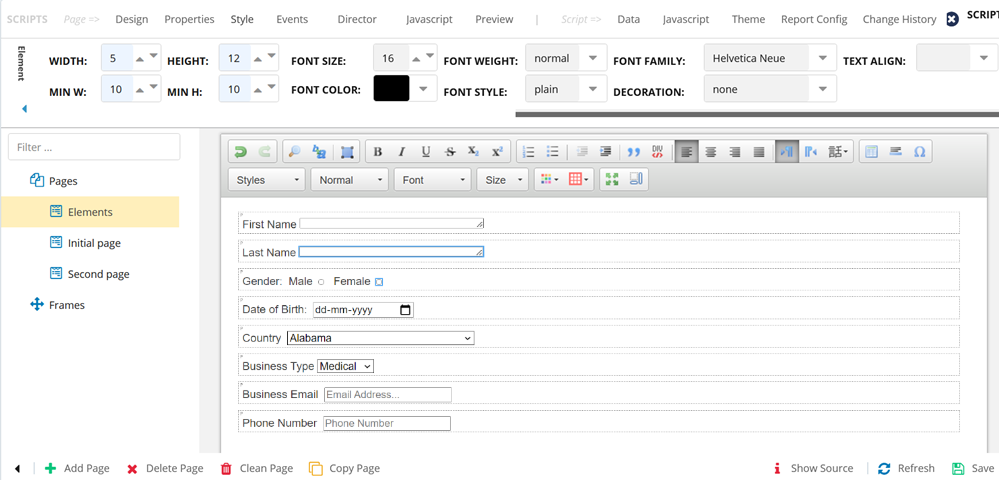
| Style Fields | Description |
|---|
| Width | Specify the width of the element. |
| Min W | You can specify the minimum width of an element. Irrespective of the value present in the field, the element remains constant with the minimum value set in this field. For example, if the Width is set to 100, and the Min W is set to 50, the field width will stay at 50 irrespective of any value in the field. |
| Height | Specify the height of the element. |
| Min H | You can specify the minimum height of an element. Irrespective of the value present in the field, the element remains constant with the minimum value set in this field. For example, if the Height is set to 100, and the Min H is set to 50, the field height will stay at 50 irrespective of any value in the field. |
| Font Size | Specify the font size. |
| Font Color | Specify the font color. |
| Font Weight | Specify the weight of the font. |
| Font Style | Specify the font style. |
| Font Family | Specify the font family. |
| Decoration | Specify if you want the decoration for the text. For example, you can specify if you want the element font to be either, Overlined, Overlined, Underline overline, or Line-through. |
| Text Align | Specify the alignment required for the text. |
| Border Width | Specify the border width for the element, if required. |
| Border Color | Specify the border color for the element. |
| BG Color | Specify the background color. |
| Opacity | Specify the degree of transparency of the text. |
| Float | Specify if you want the text to float to either left or right. |
| Padding | Specify if you want padding required for the text in the element. |