You can use the Designer window to design and create an Agent Desktop and generate scripts. 

The Designer window displays the following tabs:

NumberDescription

Desktop Designs: Enables you to configure the display, properties, and events for the Agent Desktop.

Scripter: Enables you to configure the scripts that guide agents during an activity (for example, when collecting a credit card) for the Agent Desktop.

  • The Script comes at an additional cost. Contact your Account team to enable this feature. 
  • For information about this feature, see Working with Scripter.
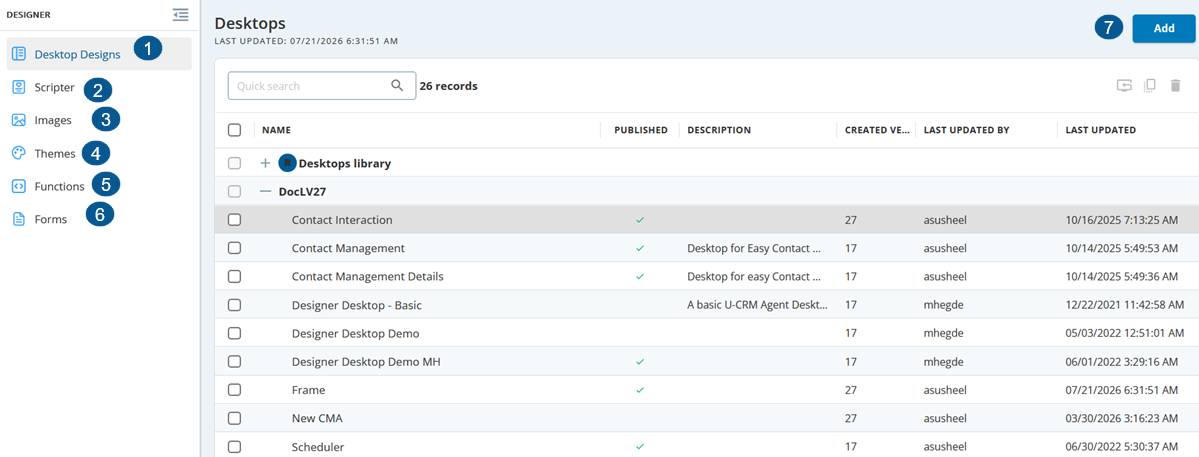

Images: Enables you to add images to scripts for the Agent Desktop.

Themes: A theme is a preconfigured design that enhances the presentation of a page. It is a consistent and unified set of visual elements and styles applied to backgrounds, text, and buttons. Implementing a theme feature in your Script application can enhance the agent's experience and streamline the design process. For more information, see Themes.

Functions: Enables you to configure the application programming interface (API) for the Agent Desktop.

Forms: Enables you to create a Form using the predefined fields designed using the template. You can insert fields to retrieve data from accounts, contacts, and tickets. The form enables you to process issues faster and improve the customer experience. Using the forms attachments option, you can provide your customers with survey forms to collect their feedback and automatically route the tickets to the appropriate department with all the key information.


Add: Enables you to create a new desktop.