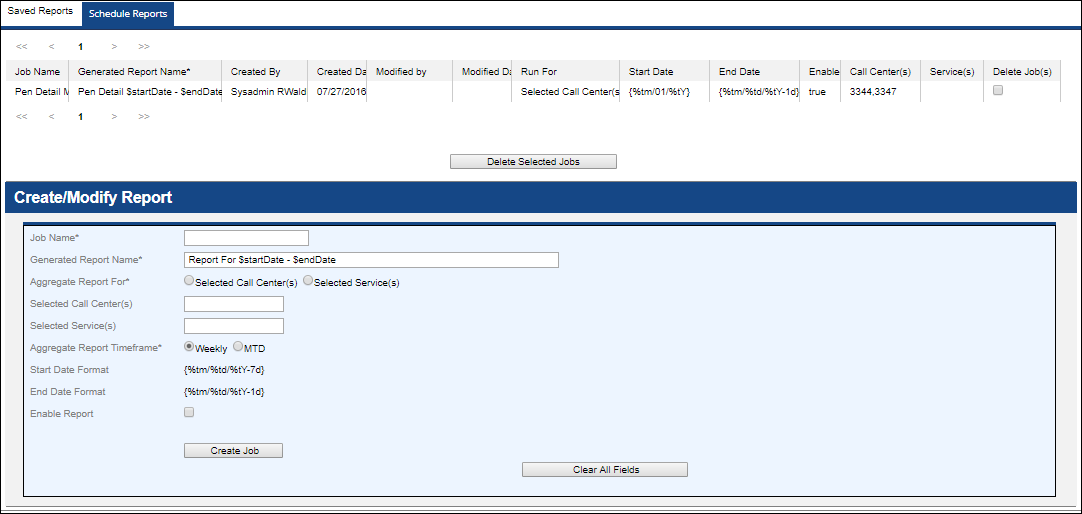
Upon clicking into any of the Analytics Reports, you can access the Saved Reports and Schedule Reports tabs to view and schedule reports.
| The Schedule Reports tab is only available to Sysadmins and Superusers. |
For scheduling reports:
- There is no particular naming syntax for "Generated Report Name". You can make it slightly descriptive like "Weekly For Barbados ", or "MTD For Barbados"
- The entry is limited to 100 characters
- The pattern $startDate, $endDate in the name, gets replaced by actual dates for the report.
- If Weekly option is chosen, the report is going to be generated for the previous week from Monday to Saturday and start/end date will be automatically populated.
- If MTD option is chosen, the report is going to be generated from the 1st of the month to the current date and dates will be automatically populated.
| Scheduled reports will run on Sundays starting at 8am for MTD and last week results. |
| Only 10 jobs per report are supported. When the amount of allowed jobs is exceeded, you will receive an "Exceeded maximum allowed jobs for this client" error. |
| Scheduled jobs can be deleted and replaced by new jobs. |