This report provides the details of all access logs and changes of recording events. You can view the details of action taken by the user or agent interacting with the recording.
Search Criteria
To access the Recording Events Report, navigate to Review > Agent Reports > Recording Events Report. This takes you to the Recording Events Reporting search tool to choose the parameters for generating the report.
This report may only be generated with a start and end time frame no greater than 90 days. Data can be generated from up to 730 days back. |

Specify the following options to generate the report. Only date range is required to generate the report and rest of the fields are optional. These optional fields can be used to get the specific records.
Generate Report and Results
After choosing the search parameters, generate the report by clicking the Generate Report button to the right of the search options. The generated report contains the following result columns.
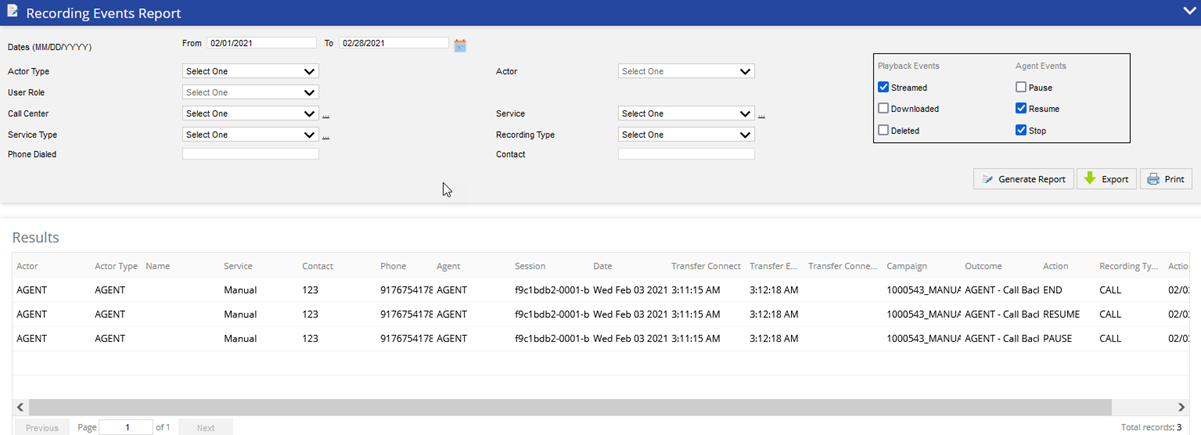
- Actor - Specifies the name of the Agent or User who interacted with the recording.
- Actor Type - Specifies if Actor is an Agent or User.
- Name - Displays the name of the contact.
- Service - The service on which the call was recorded.
- Account - The account number associated to the recording.
- Phone - The phone number for the recorded call.
- Agent - The agent who recorded the session.
- Session - Displays the session ID for screen recording and Object ID for call recordings.
- Date - Date when the call or screen recording was performed.
- Transfer Connect - The time at which the call was initially transferred in Hours: Minutes: Seconds.
- Transfer End - The time at which the call transfer was terminated in Hours: Minutes: Seconds.
- Transfer Connect Duration - The total time of the call transfer duration (Transfer End Time - Transfer Start Time)
- Campaign - The name of the campaign the recording is associated to.
- Outcome - The LiveVox result code assigned to the call.
- Action - Action taken by the user or agent interacting with the screen or audio recording.
- Recording Type - The type of recording that was accessed.
- Action Time - The date and time of the interaction.
Additional Buttons
- To export the generated report, click the Export button (next to the Generate Report button) and select the required option of file type. The available options are PDF, Excel, CSV.
- To print the generated report, click the Print button (next to the Export button). The generated report opens in another tab. Select the details for printing the report and click the Print button.