This report summarizes agent team-level metrics for the selected time periods. This report is based on the existing Agent Summary Report. This report is valuable for quickly viewing an agent team's overall metrics or comparing those metrics with the average or other agent teams.
Search Criteria
To access the Agent Team Summary Report, navigate to Review > Agent Reports > Agent Team Summary Report. This takes you to the Agent Team Summary Reporting search tool to choose the parameters for the report.
| You can generate a report for the previous 31-day period occurring during the previous 180 days. LiveVox can provide reports for additional time periods, if requested. |

Specify the following options to generate the report. Only a date range is required to generate the report and the rest of the fields are optional. These optional fields can be used to get specific records.
Generate Report and Results
Report columns and sequences can be easily modified to provide you with a report view that is important to your business operation.
Column Customization
To customize columns:
- Click the cog icon in the upper-right of the Results panel. You are presented with the Customize Column window.
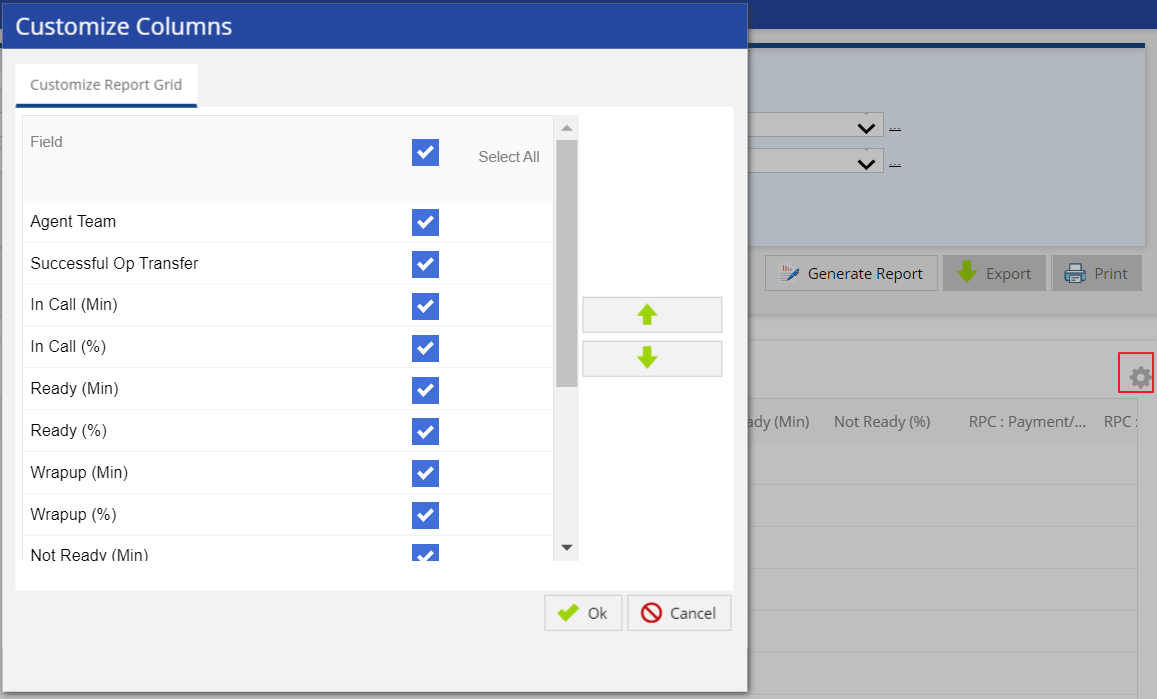
- Place a checkmark to the right of the field you want to be displayed and unchecked for those to be hidden. See below the Generate Report section for more information on available fields in the report.
- Re-sequence the displayed fields by selecting a column and moving it up or down using the appropriate button.
- Click OK to update the view.
Generate Report
After choosing the search parameters, generate the report by clicking the Generate Report button to the right of the search options. The report generates the following data when the maximum number of options (Show PTP Amount, Show Detailed, and Show Termination Codes) are selected.
You cannot generate reports for more than 3 days if the Show PTP Amount or Show Termination Codes option is selected. |
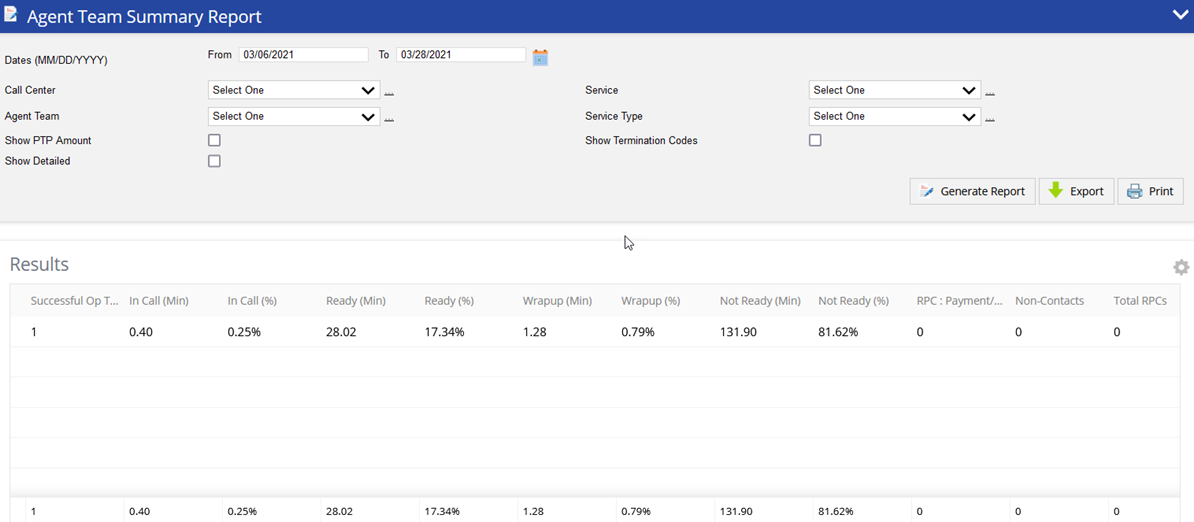
The following optional fields are available as report columns:
Time Breakdown
It provides details how agents spent their time using LiveVox for the selected time period.
- Agent Team: Agent Team name and Team ID.
- Successful Operator Transfer: Total number of operator transfers that successfully connected to an agent.
In Call (Min): Total time in minutes all agents were In Call agent state.
In Call %: Total amount of time the agents spent In Call state divided by the Agent System Time.
Ready (Min): Total time in minutes all agents were in Ready agent state.
Ready %: Total amount of time the agents spent in Ready stat divided by the Agents System Time.
Wrap Up (Min): Total time in minutes all agents were in Wrap Up state.
Wrap Up %: Total amount of time the agents spent in Wrap Up state divided by the Agent System Time.
Not Ready (Min): Total time in minutes all agents were in Not Ready state.
Not Ready %: Total amount of time the agents spent in Not Ready state divided by the Agents System Time.
Agent System Time (Min): Total time the agent was logged into LiveVox which includes Total Ready, Total in Call, Total Wrap Up, and Total Not Ready Time.
Agent Productive Time (Min): Total time in minutes the agents spent in an In Call, Wrap Up, or Ready state.
Productivity Metrics
It provides aggregated agent level productivity metrics for the selected time period.
- Average Call Handled / Agent Talk Hr: Total successful operator transfers divided by Total In Call Time in hours (In Call Minutes divided by 60).
- Average Call Handled / Agent System Hr: Total successful operator transfers divided by Total Agent System Time in hours (Agent System Time Minutes divided by 60).
- Average Call Length (Min): Total "In Call" minutes divided by Total Successful Operator Transfers.
- RPC: Payment/ PTP: Total calls with a result code of RPC with Payment Arranged.
- RPC: No Payment/ PTP: Total calls with a result code of RPC with No Payment Arranged.
- WPC: Total of calls coded as a Wrong Party Connect.
- Non-Contacts: Total calls coded as other (not RPC or WPC).
- PTP Amount: Total amount of PTP payment.
The PTP Amount can be searched across a maximum of three days if Show PTP is selected. |
- Total RPCs: Total of both RPC with Payment Arranged and RPC with No Payment Arranged result codes.
- Total RPCs/Agent System Hr: Total RPCs divided by Total Agent Productive Time in hours.
- RPC Rate (%): Total RPCs divided Total Successful Operator Transfers.
- Conversion Rate (%): Total calls coded as a PTP divided by Total RPCs.
- Termination Codes: Total calls with specific termination code selected.
The Termination Codes can be searched across a maximum of three days if Show Termination Codes is selected. |
Additional Buttons
- To export the generated report, click the Export button (next to the Generate Report button) and select the required option of file type. The available options are PDF, Excel, CSV.
- To print the generated report, click the Print button (next to the Export button). The generated report opens in another tab. Select the details for printing the report and click the Print button.