Provides you with information about key agent-level metrics displayed for an entire day. The Agent Activity Report can compare detailed agent metrics against the same agent during specific times, services, or the overall averages.
To access the Agent Activity Report, navigate to Review > Agent Activity Report.
You can generate a report for a 31-day period occurring during the previous 90 days. LiveVox can provide reports for additional time periods, if requested. |

Search Criteria
- Date Range – Enables you to enter the dates or choose them using the calendar dropdown buttons. The calendar allows you to select the start date and the end date.
- Advanced Date Configuration – Click the link next to the calendar button to open the Advanced Date Configuration selection interface.
- You can select multiple sequential or non-sequential dates using the Multiple options. You can enter dates in the format of MM/DD/YYYY or select them using the calendar button.
- Hour of Day Range – Narrows the start time and end time of your search to a particular time of the day. The time must be listed as Hours (24): Minutes: Seconds (HH:MI:SS). By default, Time Range is selected as Eastern Standard Time.
- Call Center – Select a call center from the drop-down menu. You can select multiple call centers by using the hyperlink titled Show Multi-Call Center Selection.
- Multiple Call Center Selection – Click the link next to the Call Center drop-down menu to select multiple call centers.
- Hold down the CTRL key to select multiple call centers.
- Click on the header in the Select Call Center window to sort the call centers in ascending or descending order. Navigate using the scroll bar along with the page buttons located both on the side and on the bottom of the selection criteria window.
- Use the arrow buttons to move the selection to the right-hand box. You can move one service or call center at a time using the single arrow buttons or all services/call centers with the multiple arrow buttons.
- Service – Select a particular service using the service drop-down menu. If a particular call center is selected prior to selecting a service, services that are available for that particular call center will appear.
- Multiple service Selection – Click the link next to the service drop-down menu to select multiple services.
- Hold down the CTRL key to select multiple services from the drop-down.
- Click on the header in the Select Services window to sort the services in ascending or descending order. Navigate using the scroll bar along with the page buttons located both on the side and at the bottom of the selection criteria window.
- Agent - Select an agent login ID to search for the agent's activity. You can select multiple agents by using the link next to the Agent drop-down menu.
- Multiple Agent Selection – Click the link next to the Agent drop-down menu to select multiple agents.
- Hold down the CTRL key to select multiple agents from the drop-down.
- Click on the header in the Select Agent window to sort the services in ascending or descending order. Navigate using the scroll bar along with the page buttons located both on the side and at the bottom of the selection criteria window.
- Use the arrow buttons to move the selection to the right-hand box. You may choose to move one agent at a time using the single arrow buttons or all agents with the multiple arrow buttons
- Agent Team – Select an agent team to search for the activity of agents associated with the team. Click the link next to the Agent Team drop-down menu to select multiple agent teams:
- Multiple Agent Teams Selection – Clicking on the link next to the Agent Teams drop down menu will open the multiple Agent Teams selection window:
- Hold down the CTRL key to select multiple agent teams.
- Click on the header in the Agent Team window to sort the Agent Teams in ascending or descending order. Navigate using the scroll bar along with the page buttons located both on the side and on the bottom of the selection criteria window.
- Use the arrow buttons to move the selection to the right-hand box. You may choose to move one Agent at a time using the single arrow buttons or all Agent Team with the multiple arrow buttons.
- Service group (SG) - SG is the system that defines which outbound services agents should be logged into, to receive the calls from inbound services as well as outbound blending. Adding the ability to group the reports' metrics based on the SG allows better visibility into the agents' efficiency across all services (including inbound).
- Show Termination Codes – Enabling this option provides you with a list of aggregated Agent Termination Codes used during the defined date or time range.
- Service Type – Select a service type from the Service Type drop-down.
Generate Report and Results
After specifying the reporting parameters, click the Generate Report button located at the bottom of the page to generate the report. This takes you to the report below:
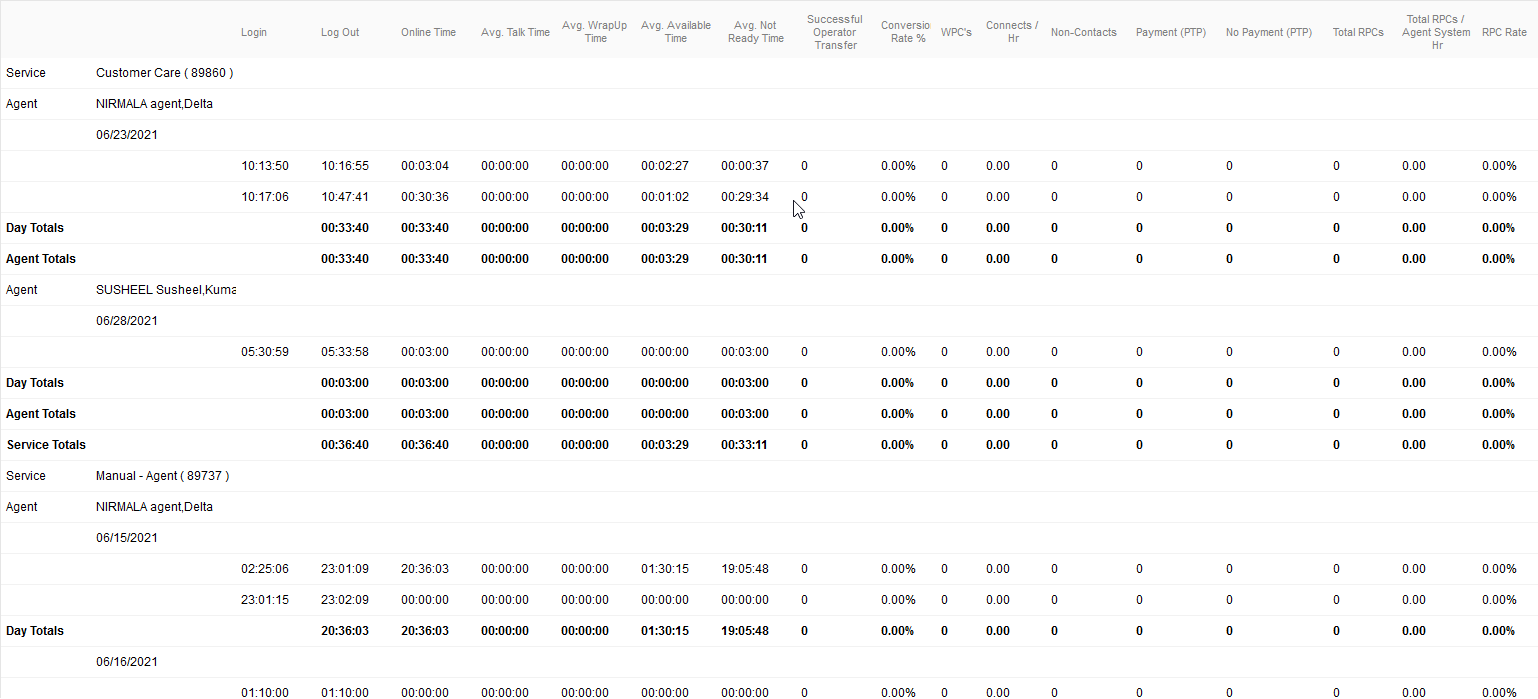
- Service: Service Name.
- Agent: Agent name.
- Login: Initial log in time for the agent listed as Hour: Minutes: Seconds.
- Logout: Log out time of the agent listed as Hour: Minutes: Seconds.
- Online Time: Total time the agent was logged into LiveVox listed as Hour: Minutes: Seconds.
- Successful Operator Transfer: Total number of operator transfers that successfully connected to an agent. This includes both inbound and outbound (IB and OB) and any calls that are transferred to an agent (phone book, agent to agent, manual and so on).
Avg. Talk Time: Total Time the agent had a status of In Call/ Total Number of Calls Handled by the agent.
Avg. Wrap Time: Total Wrap Up Time /Total Number of Calls Handled by the agent.
Avg. Available Time: The total time the agent had a status of Ready /Total Number of Calls Handled by the agent.
Avg. Not Ready Time: The total time the agent had a status of Not Ready /Total Number of Calls Handled by the agent.
Con/HR: Connects per hour derived from Total Calls Handled by the agent /Total Agent Time in hours.
- RPC: Payment/ PTP: Total calls with a result code of RPC with Payment Arranged.
- RPC: No Payment/ PTP: Total calls with a result code of RPC with No Payment Arranged.
- Total RPCs: Total of both RPC with Payment Arranged and RPC with No Payment Arranged result codes.
- Total RPCs/Agent System Hr: Total RPCs divided by Total Agent Productive Time in hours.
- RPC Rate (%): Total RPCs divided total successful operator transfers.
- Conversion Rate (%): Total calls coded as a PTP divided by total RPCs.
- WPC: Total of calls coded as a Wrong Party Connect.
- Non-Contacts: Total of calls coded as a Non-Contact.
Additional Links located in the top right corner of the generated report:
- Export to: CSV, PDF, Excel – Provides you the ability to export the report and data to another file type.