A basic setup for an email alert enables you to specify the bot goal for which you want the email alert to be generated and to specify the recipients for the email.
For information about bot goals, see Goals. |
To set up an email alert for a bot through the basic mode:
Access the bot containing the node for which you want to set up an email alert.
Specify values in the following fields.
| Field | Description | |
|---|---|---|
| Alert name | Name for the alert or the bot goal (for example, Question Asked). You can select the required name. You can also create a name for the alert by entering the name and then clicking Create New Goal. The goal that you create appears as an option in the Alert name field and the Save node as a bot goal field for anyone to use. (The latter field appears when you create or modify a node.
| |
| Route alerts to | By default, your email address appears in this field. You can, however, remove your email address by clicking the remove icon
|
Click Done.
An email alert is set up.
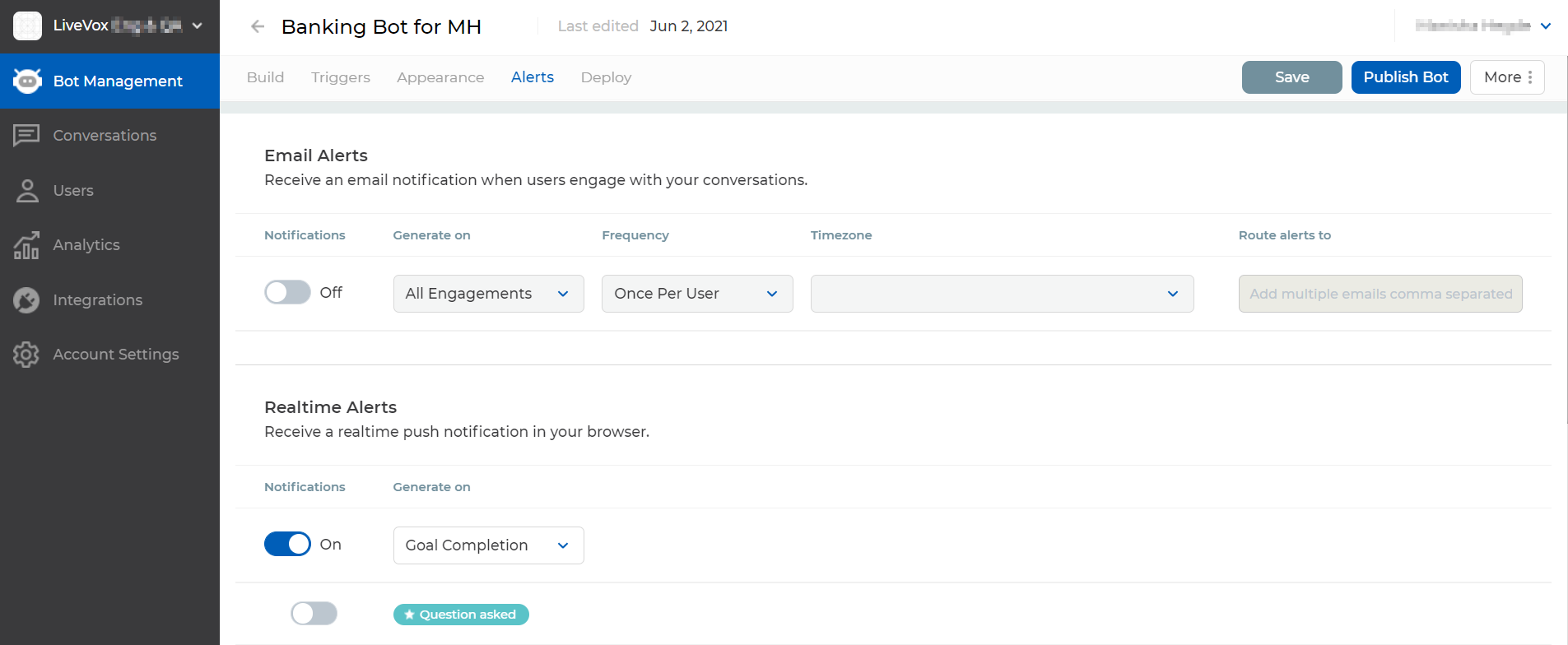
An advanced setup for alerts enables you to specify:
To set up an alert for the bot through the advanced mode:
Access the bot for which you want to set up alerts. Alternatively, if the bot is published, in the Bot Management window, in the section displaying the bot, you can click the more icon
> Alerts, and then go to Step 3.

If you want to set up an email alert, in the Email Alerts section, enable the Notifications option, and then specify values in the following columns.
| Column | Description | |
|---|---|---|
| Generate on | Select one of the following options:
| |
| Frequency | Select one of the following options:
| |
| Timezone | Time zone in which you want the date and time in the bot conversation to be displayed in the email alert sent to the recipients.
| |
| Route alerts to | Enter the email addresses of the users to whom you want email alerts to be sent.
|
If you want to set up real-time browser alerts, in the Realtime Alerts section, enable the Notifications option, and then, in the Generate on column, select one of the following options: