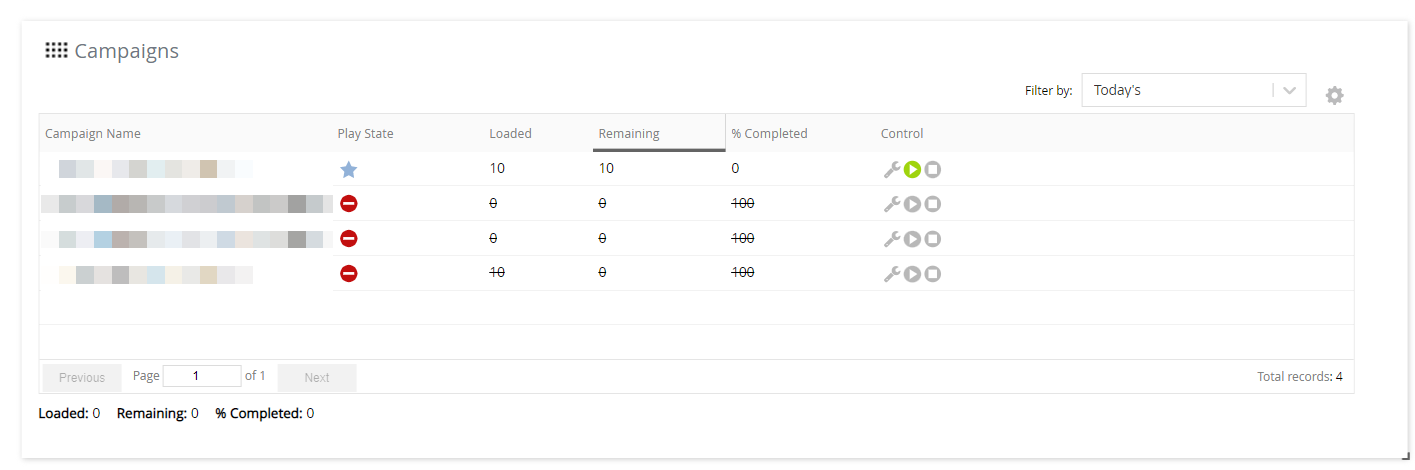
You can use the Campaign Control widget of the voice monitor dashboard to view, monitor, and control campaigns.
|
|
You can filter the campaigns on the Campaign Control widget by using the Filter By field, which contains the following options for criteria:
The following statistics appear on the Campaign Control widget:
You can customize the table on the widget by using the Customize Columns icon  .
For information about how to customize the table, see Customizing a Widget Table. |
The following table describes the columns that can be displayed on the Campaign Control widget.
| Column | Description | |
|---|---|---|
| % Completed | Percentage of contacts in the campaign that have been contacted. | |
| Actual End Time | Date and time when the campaign ended. | |
| Actual Start Time | Date and time when the campaign began. | |
| Allow Append | Indicates if the campaign can be appended. | |
| AM Option | Answering machine options for the campaign. This column contains one of the following values:
| |
| Built Date | Date and time when the campaign was built. | |
| Call Center | Call center associated with the campaign. | |
| Campaign ID | ID assigned to the campaign. | |
| Campaign Name | Name of the uploaded campaign (file name). | |
| Completed | Number of contacts in the campaigns that have been contacted. | |
| Control | Following icons to control the campaign:
The icons are disabled unless their functions are applicable to the campaign.
| |
| Date Modified | Date when the campaign was played. | |
| Loaded | Number of valid contact records loaded from the campaign.
| |
| Play State | State of the campaign. This column contains one of the following icons:
| |
| Remaining | Number of contacts in the campaign that are remaining to be contacted.
| |
| Schedule | Type of schedule for running the campaign (for example, on demand or scheduled). | |
| Scrub | Communication mode for which the contact numbers in the campaign are scrubbed. This column contains one of the following values:
| |
| Service ID | ID of the service associated with the campaign. | |
| Service Name | Name of the service associated with the campaign. | |
| Strategy | Strategy for contacting the numbers in the campaign. | |
| Type | Type of service for the campaign (for example, outbound). | |
| Uploaded | Number of contacts uploaded in the campaign. | |
| Uploaded Date | Date and time when the campaign was uploaded. | |
| Voice | Voice talent assigned to the campaign (for example, Bob (American Male), Claudine (French Canadian Female), or Juanita (Spanish Female). |
If an active campaign is appended with contacts, the following statistics are accordingly updated on the widget:
|
 on the widget.
 on the widget.
 on the widget.
 on the widget.
 : Processes (builds) the contacts in the campaign, changing the campaign state from
 : Temporarily stops the campaign, changing the campaign state from
 : Plays the campaign, changing the campaign state from
 : Permanently stops the campaign, changing the campaign state from
 : Campaign is not yet processed for contacting.
 : Campaign is loading.
 :
 : Campaign is active and calls are being placed.
 : Campaign is paused and is ready to resume playing.
 : Campaign is completed or stopped; however, it is yet to be reported.
 : Campaign is completed or stopped, and it is reported.
 : Campaign is scheduled to play at a predefined time.
 : Campaign has encountered errors.