You can create new custom fields and define the data type for these fields via Field settings. It allows you to easily identify, report, segment, and store the data points as needed. Custom fields are first defined in Field settings before they become available for use within Contacts Manager, Segmentation settings, and Contact Flow. Navigate to the Field settings by selecting Configure > System > Fields from the navigation panel.
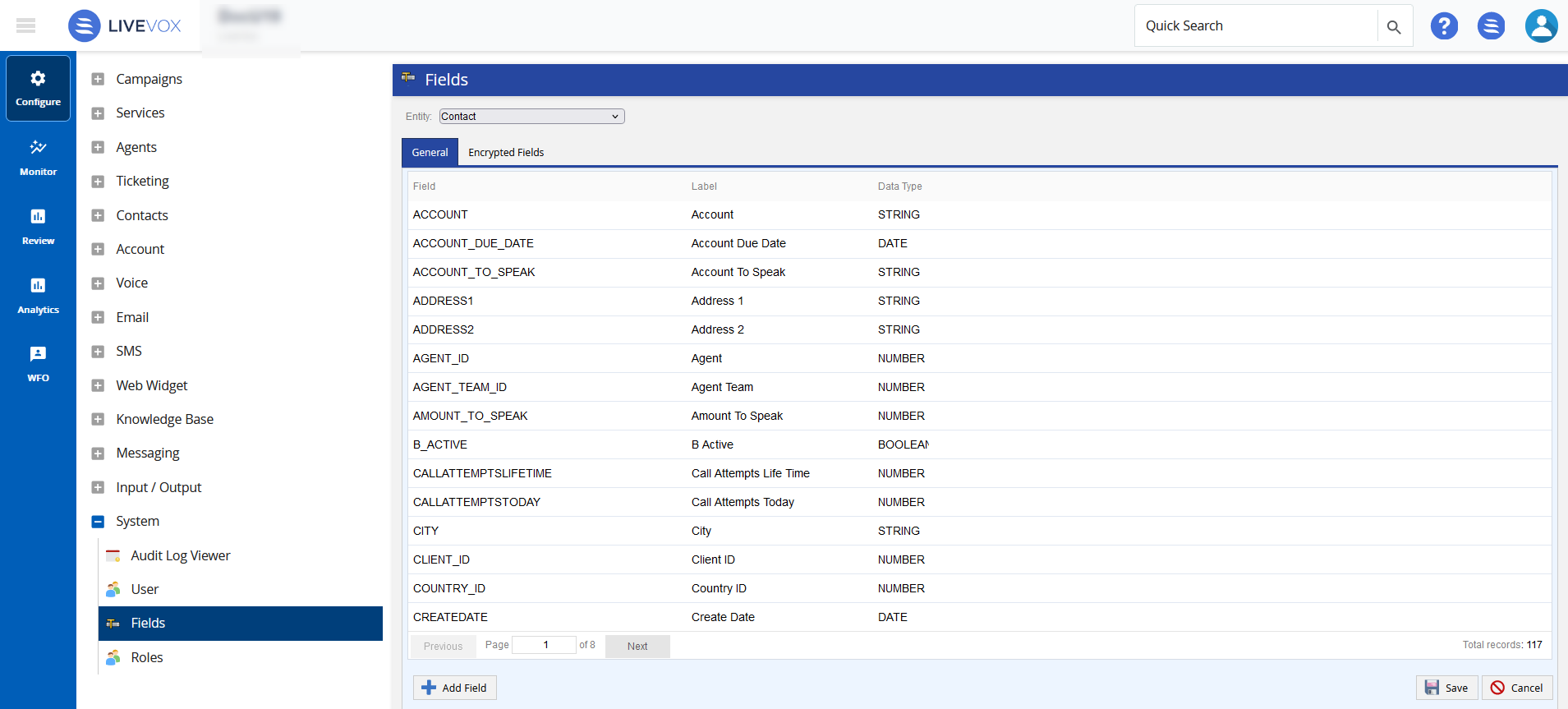
The Field settings displays the list of fields existing in the selected Entity and offers the following fields and buttons:
- Entity: Displays the associated entities to the selected fields. You can select the required entity from the Entity drop-down menu:
- Contact: Select Contact for fields that are associated with a specific record in Contacts Manager.
- Transaction: Select Transaction for Campaign-based fields that are associated to records within a campaign.
- Interaction: Select Interaction for Contact Flow based fields that are associated to a specific call, email, or SMS.
- Account: Select Account to add custom fields to Accounts entity that can be utilized for accounts record.
- Ticket: Select Ticket to add custom fields to Ticket entity.
- Agent: Select Agent to add and associate custom fields to Agent Profile. Custom fields associated with Agent entity can be utilized through the Details tab of Agent Details screen. See Viewing Existing Agents section for information on Agent Details screen.
The Field settings offers the following tabs and links:
- General: displays the list of fields.
- Field: Displays the field name of the selected entity.
- Label: Displays the label associated to the field name.
- Data Type: Displays the data type defined for a field.
- Add Field: Allows you to add new custom field. See Adding and Modifying Custom Fields section for instructions on creating new custom fields.
- Save: Click Save to save the changes.
- Cancel: Click Cancel to discard the changes.
- Encrypted (For Contact Entity only): Displays the list of encrypted contact fields.
The Encrypted Fields feature needs to be enabled in order to view the Encrypted tab. You can verify this is enabled in the Billing tab of the Client section. See Client Editor - Billing Tab for more information. |
- Field: Displays the default name of the encrypted field.
- Label: Displays the modified name of the encrypted field.
- Data Type: Displays the data type defined for the encrypted field.
- Add Encrypted Field: Allows you to add a new encrypted field. See Adding and Modifying Encrypted Fields section for instructions on creating new encrypted fields.
- Save: Click Save to save the changes.
- Cancel: Click Cancel to discard the changes.