This tab allows to adjust current agent desktop. This section reflects the pieces of data which will appear on your agent's desktop while working a call. Customer data (name, account number) displayed will come from your input file and while call data (phone number, inbound vs outbound) will come from LiveVox. Navigate to Configure > Agents > Agent Desktop > ScreenPop tab.
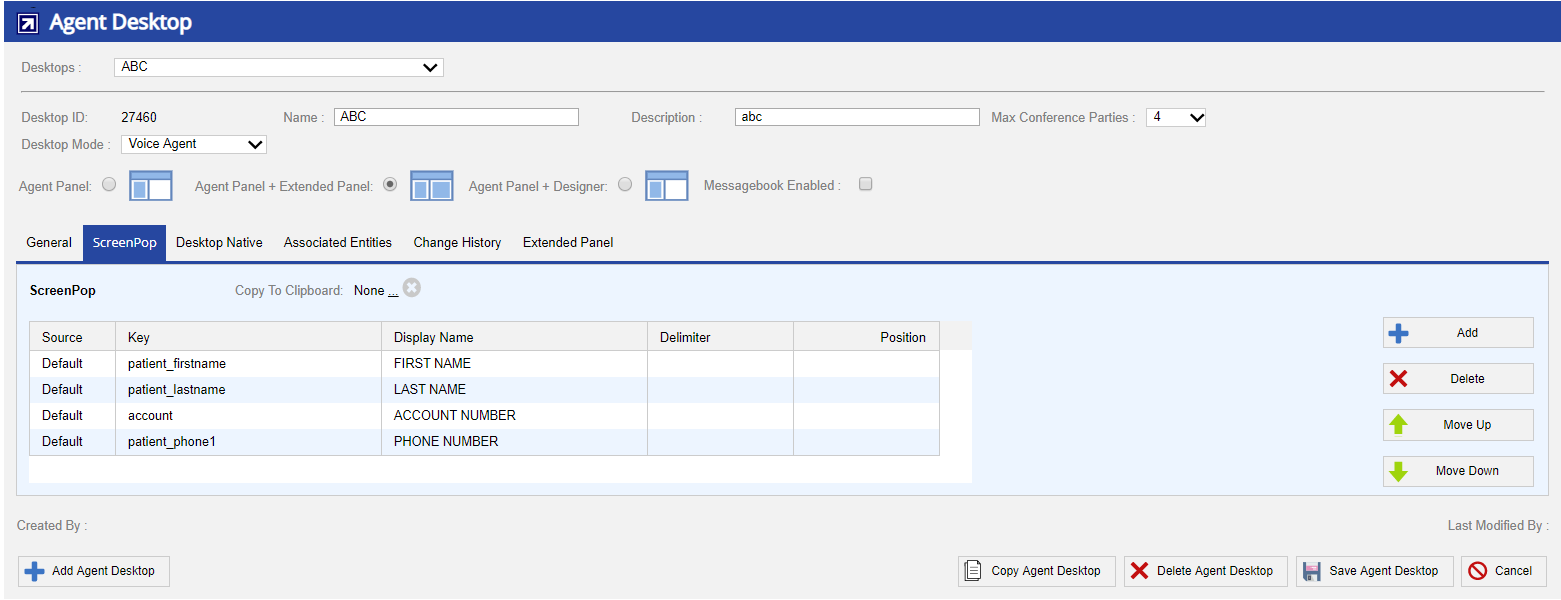
- Copy data from clipboard - Allows you to select the field from the drop-down menu to be copied to the agent's clipboard.
Click More Options icon (...) to select a field and click  to clear the selection. |
- Add - Adds new information field.
- Delete - Deletes selected field.
- Move Up - Moves the selected field up one space.
- Move Down - Moves the selected field down one space.
Data Field Details
Click the Add button to add new field to screen pop. You are prompted to enter the following information:
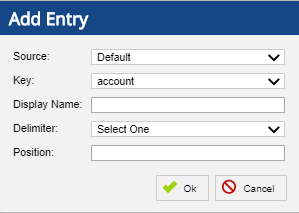
- Source - Allows to configure call transactions, file (campaign) based values, Call Flow, and Contacts variables. According to configuration, source fields are displayed to the agent (screenpop).
- Default - Select the option to display call transactions and file based values.
- Contact - Select the option to display the configured Contacts manager variables.
- CallFlow - Select the option to display customer IVR responses or web service calls.
- Key - The database location to display. This location may reference data from the input file or information on the current call.
- Display Name - The descriptive label for the field, shown on agent screen.
- Delimiter - Only necessary for Transformations.
- Position - Only necessary for Transformations (see Unpacking a Transformation on the Desktop).
To save changes, select the Save Agent Desktop button in the bottom right.